
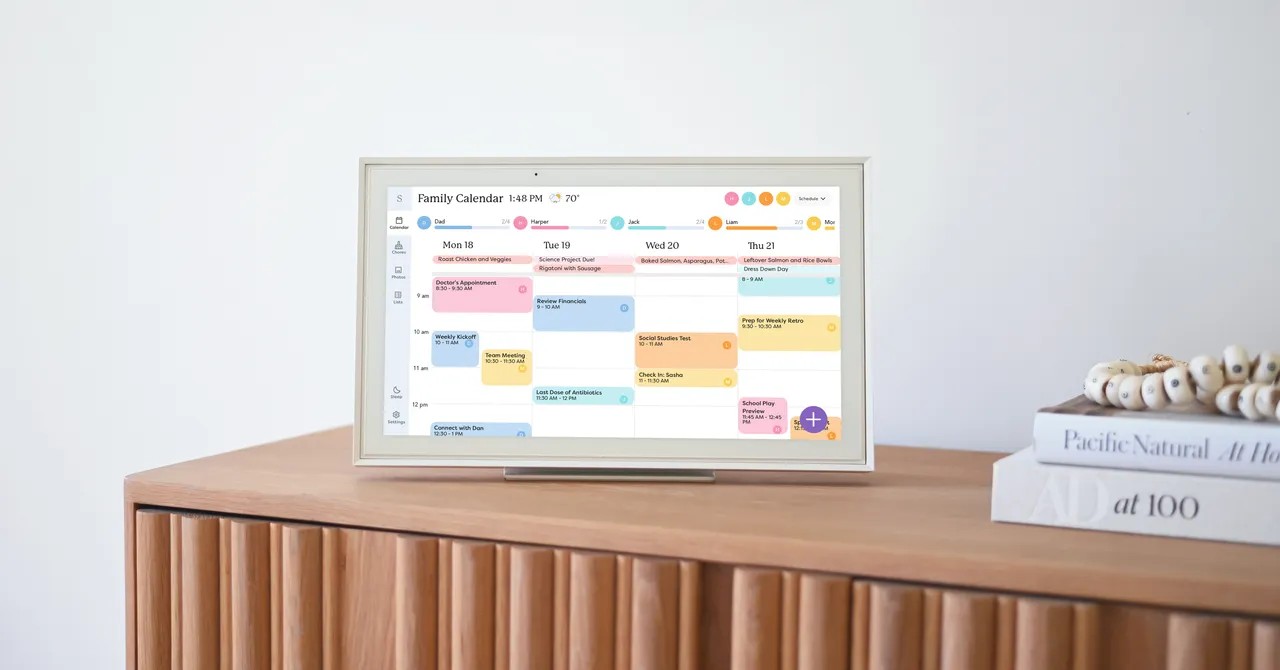
Juggling a household of five isn’t a job description, it’s a hostage situation.
Three kids. Three schools. Endless extracurriculars. Work schedules that shift faster than the wind. Add meal planning and the infinite loop of house upkeep, and you’re doing math nobody else is looking at. For years my husband and I relied on a shared Google Calendar. Helpful? Yes. Enough? Not even close.
Enter the Skylight Calendar.
It’s a touchscreen device. We got one to test out, and immediately, the power dynamics in my kitchen shifted. My kids—a 15-year-old teen and a 12-year-old tween—are old enough to care about their time, young enough to want a shiny screen to do it on. Younger kids? Probably not worth it for them, but my son took the 15-inch display by the throat the second we unboxed it.
Setup and Color Wars
He set it up on the kitchen counter himself. The device sits on a built-in stand, though wall mounting is an option for the larger sizes. Everyone downloaded the app. Everyone synced up.
Then the real work started.
He pulled my Google Calendar into the Skylight system to establish a baseline. From there, he did something brilliant. He created color-coded sub-calendars for each of us. He pulled activities off my master list and slotted them into our individual colors.
But here’s the kicker. He added a color for chores. Taking out the garbage. Recycling. Tasks that usually exist in the gray fog of “someone else should have done this.” He gave those duties their own digital home. I liked this. It meant even if I was the one still lifting the heavy trash bag, at least it was acknowledged as a line item rather than an afterthought.
I was surprised by their excitement. They wanted to see the family schedule. Suddenly they weren’t asking me, “Can I go out on Thursday?” They checked the screen. They cross-referenced. They solved it. I lost responsibility, but gained freedom.
The privacy cost is real though. My Google Calendar has personal notes. Little reminders. “Buy Sam’s birthday gift.” Now everyone knows I’m slacking. Or buying a gift late. I’m already learning to hold my tongue when I type.
The Grocery List That Actually Works
For years our shopping list was a sticky note on the fridge. It led to missed bread runs and mountains of rotting bananas. The Skylight app fixed this.
Everyone has the phone app. Everyone adds items. If I’m near the store, I check the list. Simple.
My son said it himself: We won’t forget again.
The Paywall And The Paper Trail
Not everything on the Skylight is free. To get the good stuff, like the meal planner or Sidekick (an AI assistant), you need the Plus subscription. That’s $79 a year.
I used Sidekick. And I loved it.
I’ve spent 15 years typing in school dates and sports schedules by hand. Sidekick lets you take a photo of a paper schedule or forward an email. It scrapes the info and adds it to the calendar. Is it perfect? No. But it beats manual entry.
It also handles recipes. You scan a printed card or page from the internet, add it to a digital book, then drag it into your weekly menu.
My son spent hours scanning our physical recipe book into the system. Fun for him? Sure. Practical for me? Not always.
Mostly I don’t use recipes anyway. Stir-fry doesn’t need instructions, but it’s on the menu every week. When I did try the feature, it had mixed results. Assigning kale chips worked great because it added the three ingredients to our grocery list. Trying it for minestrone soup? The app added every single thing, down to “dash of salt.” Annoying.
A Desktop Device In A Mobile World
There’s one big flaw. No battery.
The Skylight Calendar needs to be plugged in.
This means if I’m on the couch, I can’t use it. I use the mobile app more often than the touchscreen itself. My husband does the same—he glances at the big screen for updates but uses his phone to add events. My kids? Almost entirely on their phones.
We did add a widget to our home screens, though. Available on iOS and Android, it gives a quick peek at the day’s agenda without launching the app. Small convenience. Big time saver.
Is The Hardware Necessary?
I looked at two alternatives: Jam Family Calendar and Family Wall. Both are software-only. No expensive screen required. Just the phone apps.
Jam has the same basics. Color coding. Google integration. Grocery lists. It works on your existing devices, which costs $300 less than the Skylight hardware.
So why pay for the box?
Maybe just so your twelve-year-old feels like a project manager. That seems to be enough for us. Though I still can’t find my son’s birthday gift receipt, so I’m still worried someone is peeking over my shoulder. 🛒